
Hulusport registration takes a couple of minutes and runs on a phone number, not an email address. You fill in a short form, confirm the number with an SMS code and the account is ready for login. This page walks through each screen, then covers verification, password recovery and the everyday account questions that come up afterwards.
Hulusport Betting is an independent information page about the brand. The account itself is created on the operator's own platform through the button below.
Phone number · Ethiopia (+251)
Who can register
An account is meant for adults in Ethiopia. The site's legal age is 18+, and the registration form asks you to tick a box confirming you are above the required age. The version of the form shown here mentions 21, so if you are between 18 and 21, check the current wording on the form before you start.
Two more rules apply. One person, one account: duplicates and accounts opened on someone else's behalf can be blocked. And the phone number has to be yours, because both the activation code and later recovery go to it.
How to register on Hulusport step by step
Creating an account
Open the registration form
Tap Register in the top corner of the Hulusport site or follow the registration link. A Create an account window opens.
Enter your details
Type your name, then your phone number after the +251 country code. Choose a password and repeat it in the second field.
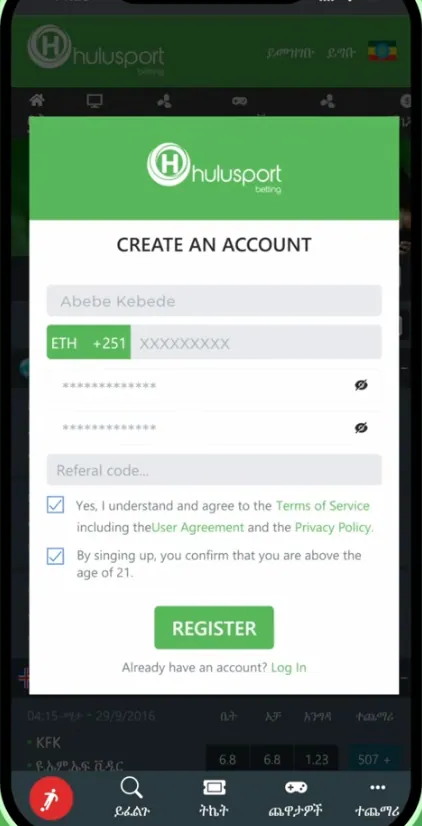
Add a referral code if you have one
The Referral code field is optional. Leave it empty if nobody invited you.
Accept the terms and confirm your age
Tick both boxes: the Terms of Service, User Agreement and Privacy Policy, and the age confirmation. Then press Register.
Enter the SMS code
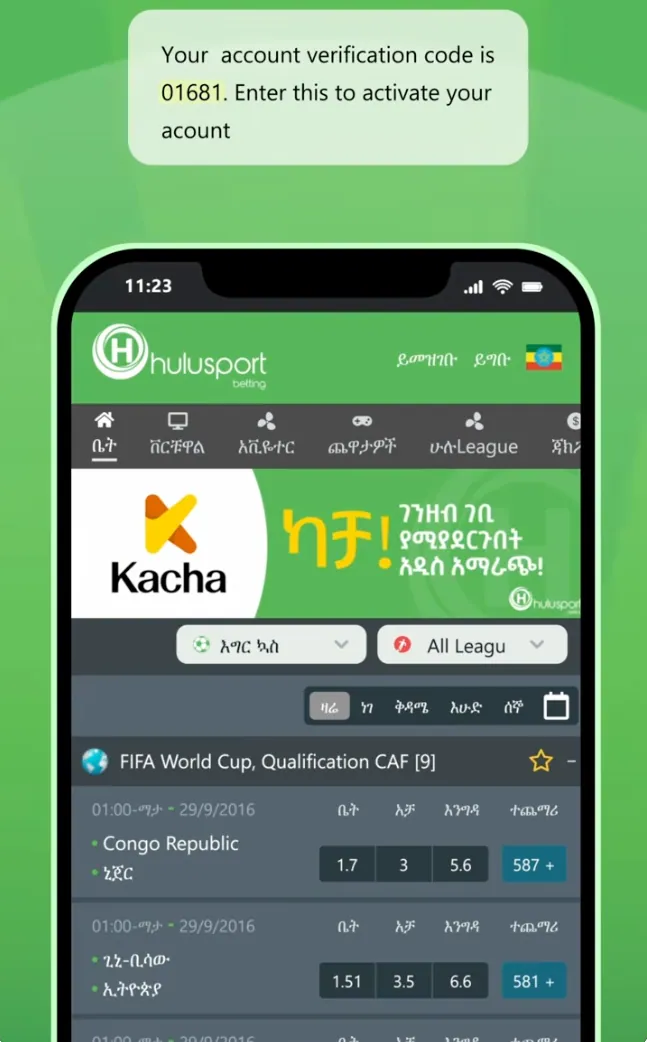
A text message arrives with a short verification code. Enter it in the code window to activate the account.
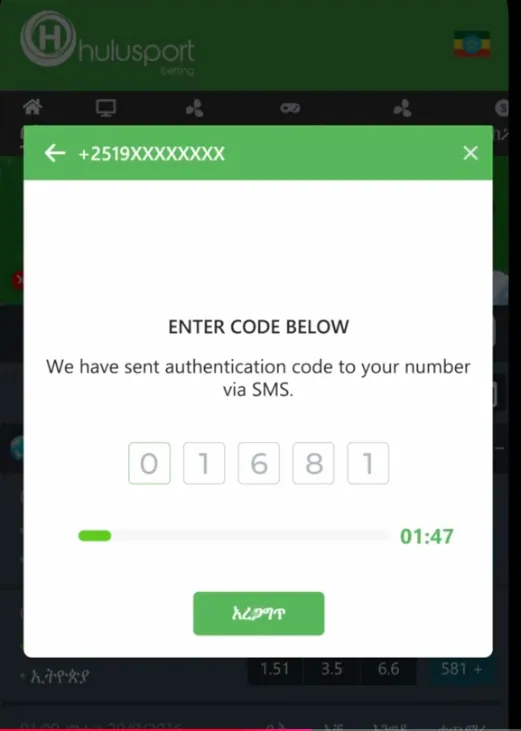
The code window has a countdown of about two minutes. If it runs out before you type the digits, go back and request a new one.
Registration data at a glance
| Item | What is asked | Confirmation |
|---|---|---|
| Phone number | Ethiopian number with the +251 code | SMS code |
| Name | Your full name | Checked later if verification is requested |
| Password | Entered twice | None |
| Referral code | Optional | None |
| Terms and age | Two tick boxes | Ticked by you |
Email, social network and Telegram sign-up were not part of the form shown, so plan on the phone-number route.
Account verification
The SMS code confirms the number. A separate identity check may be requested before larger withdrawals, which is common for licensed operators. Use your real name when you register: if it does not match your ID, a later check can stall a payout.
Exact document lists and processing times are set by the operator and can change, so the reliable source is the notice inside your account or customer support. Before your first cash-out it helps to read the payments page, which covers deposit and withdrawal methods.
Logging in
Login is short: tap Login, enter the phone number with the +251 prefix, type the password and press the green button. The form also carries a link for a forgotten password and a link to register if you have no account yet.
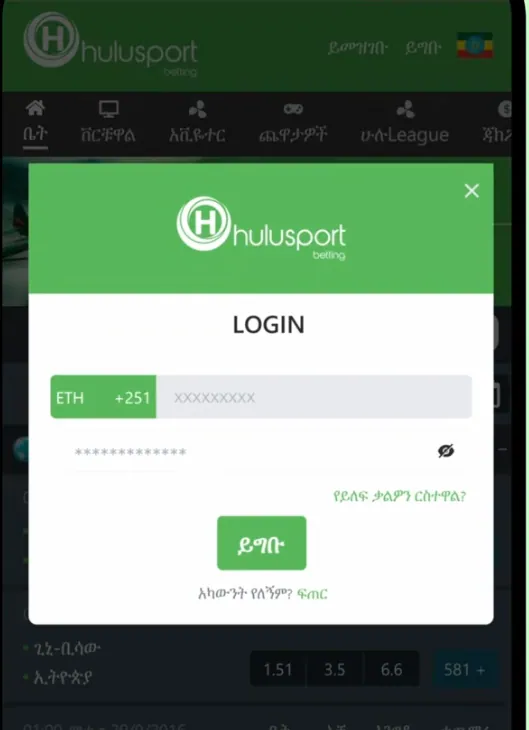
The same details work in the mobile app, so there is no second account to make. If you prefer an app icon on your phone, see the Hulusport app page for installation.
If login fails
- Wrong number format: enter the digits after +251 without a leading 0.
- Wrong password: check caps lock and the keyboard language.
- Account not activated: if the SMS code was never entered, request a new code and finish activation.
- Weak network: the SMS can arrive late. Wait a minute before asking for another one.
Password recovery
Tap the forgotten-password link in the login window and enter your phone number. A code is sent to it by SMS, and after entering it you can set a new password. That is why the number must stay under your control: lose the SIM and you lose the easy route back in.
Managing the account
Changing the phone number or personal data. The phone number is the account's identity, so it is not something to edit casually. Contact support with proof of ownership.
Bet history. Settled and open bets are listed in the account section of the site, which is also where to look when a result seems off.
Closing or limiting the account. Ask support to close or deactivate it. If gambling stops being fun, request a limit or a self-exclusion instead of just walking away.
Once you are in, the next stop is usually the bonuses page for the welcome offer, or the home page for the full list of sections.
Keeping the account safe
- Pick a password you do not use anywhere else, with letters and digits.
- Never pass the SMS code to anyone. Support does not need it.
- Log out on shared phones.
- Open the site from a link you trust, not from a message of unknown origin.
Play within your means
Betting is for adults only. Set a budget before the first deposit and keep to it.
Frequently asked questions
How do I register on Hulusport?
Open the registration form, enter your name, Ethiopian phone number (+251), a password and its repeat, tick the terms and age boxes, press Register and enter the SMS code.
Can I register without an email address?
Yes. The form shown works with a phone number, so no email is requested.
What is the minimum age to register?
The site is for adults, 18+ by its legal settings. The form asks you to confirm your age, and the version shown mentions 21, so check the current wording before signing up.
I did not get the SMS code. What should I do?
Wait a minute, check that the number has the +251 code and no leading zero, and request a new code if the countdown has ended.
How do I log in to Hulusport?
Tap Login, enter your phone number with the +251 prefix and your password, then press the login button. The same details work in the app.
How do I reset a forgotten password?
Use the forgotten-password link in the login window, enter your phone number and follow the SMS code to set a new password.
Can I have more than one account?
No. One person may hold one account, and duplicates can be blocked.
How do I close my account?
Contact customer support and ask to close or deactivate it. You can also ask for limits or self-exclusion.